
PNC Mobile
PNC Bank, N.A.Finance
4.5120.65K Reviews
- Version
- 5.4.2
- Installs
- 10.00M
- Age Rating
- Everyone
Screenshots
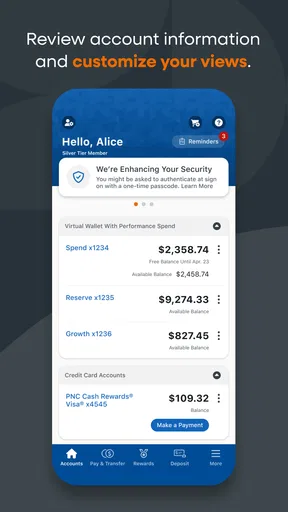
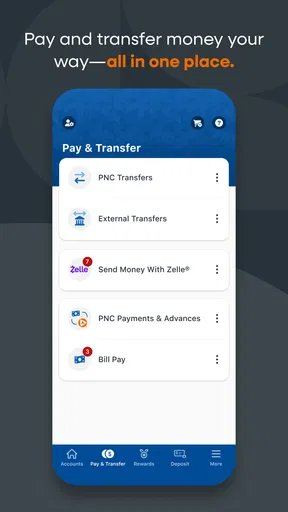
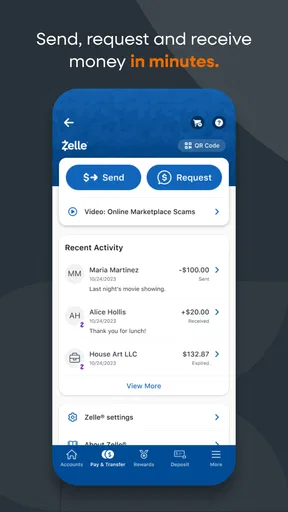
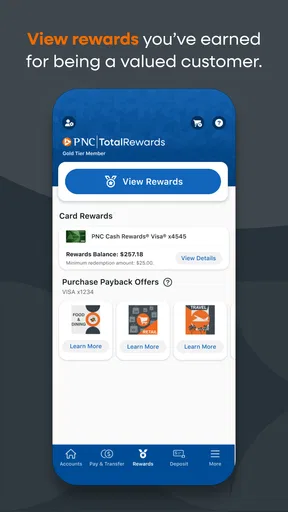
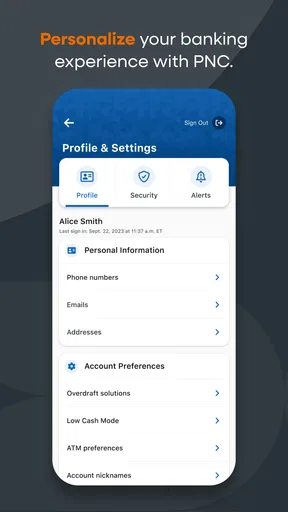
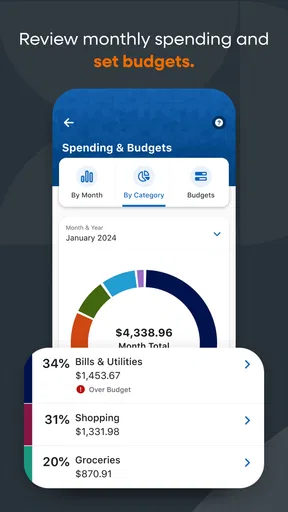
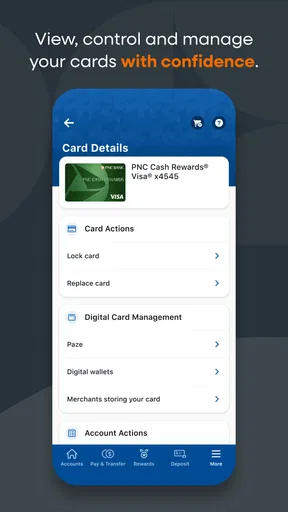
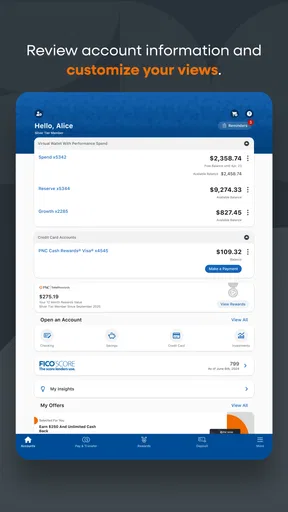
Our Review of PNC Mobile
 Analysis by Appyee
When I first open a banking app, I want to know one thing quickly: can I get from installation to a useful result without feeling lost? PNC Mobile is designed for that first practical need. It gives PNC customers a way to reach their bank accounts at any time and look for a nearby branch or ATM, while keeping the experience focused on everyday money management rather than trying to become an all-purpose financial marketplace.
In my experience, that focus is its biggest advantage. The app is free, belongs to the finance category, and is developed by PNC Bank, N.A. It has a 4.5 average from around 313,000 ratings, with more than 10 million installs. Those figures suggest that it is not a niche companion for occasional customers; it is a familiar mobile banking route for a large PNC user base.
PNC Mobile is best understood as a convenience layer for an existing PNC relationship. It does not replace the bank itself, and it is not the right tool for someone who does not use PNC. For a PNC customer, though, the value is straightforward: check what is happening with your accounts, handle routine banking from a phone, and find physical help when a mobile screen is not enough.
What the first visit feels like
The first screen should be approached with a simple goal rather than an attempt to explore everything at once. I recommend deciding whether you want to confirm your balance, review recent activity, or locate an ATM. That small choice makes the app feel much less overwhelming, especially if you are opening it during a busy moment.
The app is available for everyone from an age-rating perspective, but financial responsibility still matters. A younger person may be able to use the software in a general sense, yet access to actual banking information depends on having the appropriate PNC relationship and login details. That distinction is important: the age label describes the app’s content, not eligibility for a bank account.
The current version is 5.4.2, and the minimum operating-system requirement is iOS 9 or later. Before installing, I would still make sure the phone is running a reasonably current system if possible. Banking apps handle sensitive tasks, so an old device can create more friction than the app itself, particularly if the phone has trouble with modern sign-in screens or general security updates.
One useful expectation to set is that the app is not a substitute for every banking conversation. If you need a complicated account explanation, a disputed transaction investigated, or help with something that requires personal review, the mobile interface may only be the first step. Its strength is speed for ordinary actions, not eliminating the need for human support in unusual cases.
Before you begin, gather the essentials
For a smoother first session, I would have my PNC login information ready and make sure I am not trying to register while distracted in a public place. I would also check that the phone has a stable connection and enough battery for a complete sign-in. These are small preparations, but they prevent the most common false impression that a banking app is malfunctioning when the real issue is an interrupted connection or forgotten credentials.
I also prefer to install a finance app directly from the official app marketplace rather than from a message or an unfamiliar website. That habit matters more with banking software than with a casual game. After installation, I would confirm that the developer shown is PNC Bank, N.A. and avoid entering account details into anything that looks like a copycat application.
Once the app opens, resist the temptation to tap randomly through account screens. A banking app is easier to understand when you move deliberately. Sign in, identify the account you actually use, and look for a current balance or recent activity view. That gives you an immediate reference point and makes later visits faster.
Turning installation into a useful first result
The first meaningful success I would aim for is confirming a recent transaction. It is more useful than merely opening the app because it checks several things at once: the installation works, the sign-in is accepted, the correct account is visible, and the information shown is relevant to your daily finances.
After signing in, I would look for the account overview and then recent activity. If I had just made a purchase, received a payment, or moved money, I would use that event as my test. I would not make an unnecessary transfer simply to test the software. A real transaction already gives you a safe, practical way to learn where the important information appears.
This workflow also helps with a common banking mistake: confusing an available balance with the amount you believe you should have. Instead of relying on one large number, I would scan recent activity and consider pending or recently made purchases before deciding that something is wrong. The app can show you account information, but careful interpretation remains your responsibility.
A second useful first action is finding a nearby branch or ATM. I would use this when I know I will need cash, a deposit location, or in-person assistance later in the day. The location function is more valuable when used before leaving home: check the result, note the destination, and then verify that it suits the task you have in mind. A nearby ATM is not automatically the best choice if you need a service that belongs at a branch.
A realistic everyday workflow
Imagine that I am leaving work and realize I need cash for an evening purchase. Rather than searching the web and sorting through unrelated map results, I open PNC Mobile, sign in, and use its location tools to look for a nearby PNC ATM. I can then check my account activity first, confirm that the cash withdrawal will fit my budget, and head to the location.
That sequence shows where the app is genuinely helpful. The account view answers “can I afford this?” while the location search answers “where can I do it?” Keeping both tasks in one banking environment reduces the need to switch between a general map, a browser, and a separate financial screen. It is a modest convenience, but it is exactly the kind of convenience a mobile bank should provide.
Another scenario is checking a payment after a weekend away. I would open the app, review the relevant account activity, and compare the entries with my receipts. If something looks unfamiliar, I would record the transaction details before contacting PNC. That preparation can make a support conversation clearer than simply saying that the balance seems wrong.
Where first-time users may hesitate
Banking apps often feel more complicated than they are because they combine private account information with actions that have real consequences. My advice is to treat viewing and acting as two separate stages. First understand which account and transaction you are looking at; only then decide whether you need to do anything else.
Location tools can also cause confusion if you expect them to answer every question about a branch or ATM. Their main purpose is helping you find a physical PNC location. If your need is account-specific or requires a detailed explanation, finding a location is only the beginning. I would use the app to narrow down where to go, then rely on the appropriate PNC support channel for the issue itself.
Another point worth remembering is that a mobile banking screen is not a budgeting plan. The app can help me see account activity, but it does not automatically understand upcoming bills, cash spending, or financial priorities unless I do that thinking myself. I find it most effective when I use it as a quick source of current information and pair it with my own budgeting method.
How it fits into real banking habits
Compared with visiting a branch for every balance check, the app is obviously faster and more convenient. Compared with using a phone browser, a dedicated mobile banking app usually feels more direct because the experience is built around account access rather than a full website. The trade-off is that the app is tied to PNC. A browser may be more useful if I manage several banks and want one general place to work, while PNC Mobile is the more focused choice for someone whose primary relationship is with PNC.
It is also different from independent budgeting applications. Those tools may be better for seeing several financial institutions together or analyzing spending across accounts. PNC Mobile makes more sense when I want the bank’s own view of my PNC accounts and a direct route to PNC locations. Choosing between them depends on whether the priority is banking access or broader financial organization.
For a first-time user, I would build a small routine instead of checking constantly. Open the app when you need to confirm a balance, review a purchase, prepare for a cash withdrawal, or locate a physical banking point. That keeps the app useful without turning every phone check into a source of financial anxiety.
Three habits that make the app more useful
- Use a real transaction as your first test. Reviewing something you actually recognize teaches you more safely than experimenting with an unnecessary money movement.
- Separate location planning from account decisions. Find the ATM or branch first, then decide what you need to do there. This avoids arriving at the wrong type of location.
- Save context before asking for help. If an entry looks unfamiliar, note its date, amount, and description as shown in the app before contacting PNC. A precise question is easier to explain than a general concern about a balance.
These habits reveal a less obvious strength of the app: it can support a short decision process, not just display a number. I can check the account, connect that information to a real-world task, and choose whether mobile access is enough or whether I need a physical location or personal assistance.
Limitations I would consider before installing
The most important limitation is its narrow usefulness outside the PNC ecosystem. If I do not bank with PNC, the app offers little reason to remain installed. Even for PNC customers, people who want extensive cross-bank budgeting may prefer a broader financial tool alongside it.
I would also avoid expecting the app to resolve every banking problem instantly. A mobile screen is excellent for routine access, but unusual account questions, suspected errors, and situations requiring judgment can still lead to a branch or support conversation. That is not a failure unique to this app; it is a boundary of self-service banking that is worth understanding before relying on it for everything.
Privacy and attention are practical considerations too. I would avoid opening account details where other people can easily see the screen, and I would not rush through a financial action while commuting or multitasking. The convenience of mobile access is strongest when paired with a few seconds of care.
Who should use it, and who should choose something else?
I would recommend PNC Mobile to an existing PNC customer who wants a straightforward way to reach account information and locate PNC branches or ATMs. It is especially suitable for someone who regularly checks purchases, needs banking access away from home, or wants to reduce unnecessary branch visits.
I would be less enthusiastic for someone looking for a complete financial dashboard across multiple banks, a dedicated investment workstation, or a detailed budgeting system. In those cases, another category of app may fit better, with PNC Mobile serving only as the direct account-access option for PNC information.
The free price removes an obvious barrier, but the real question is whether the convenience matches your banking habits. If you rarely use a phone for financial tasks and live close to a branch, the benefit may be modest. If you often need a quick account check or location search, the time saved can make it worthwhile.
My recommendation after using it
PNC Mobile succeeds because it concentrates on a clear job: giving PNC customers practical mobile access to their banking relationship and helping them find physical PNC locations. I appreciate that it can support a complete everyday sequence, from checking account activity to planning a cash visit, without requiring several unrelated tools.
My recommendation is to install it with one small objective in mind. Sign in, confirm a recognizable piece of recent activity, and try the location search only when you have a real need. Once that first successful action is complete, the app becomes easier to judge on your own terms.
It is not a universal replacement for budgeting software, a browser, or personal banking support. It is a focused finance app from PNC Bank, N.A., and that focus is both its strength and its boundary. For PNC customers who value quick access and practical location help, I find it a sensible everyday companion; for everyone else, there is little reason to choose it over a tool connected to their own bank.
Verdict
Strengths of PNC Mobile
- Quick access to balances, transactions, and account details.
- Mobile check deposit reduces the need to visit a branch.
- Bill pay and transfers are convenient for everyday banking.
- Card controls help manage purchases and report lost cards.
- Biometric login adds a fast, secure sign-in option.
Limitations of PNC Mobile
- Some features may vary depending on your PNC account type.
- Mobile check deposits can have limits and delayed availability.
- The app requires a stable internet connection for most functions.
- Occasional updates may change the layout or menu navigation.
- Certain support requests may still require contacting the bank directly.
Similar Picks in This Category
View All
Google Wallet
Google LLC4.3

Airtel: Recharge, Bank & Loans
Airtel4.0

PayPal - Pay, Send, Save
PayPal Mobile4.2

DANA Indonesia Digital Wallet
PT Espay Debit Indonesia Koe4.5

Binance: Buy Bitcoin & Crypto
Binance Inc.4.8

Cash App
Block, Inc.4.7
Frequently Asked Questions
What is PNC Mobile and what can I do with it?
PNC Mobile is the official mobile banking app from PNC Bank, designed to let customers manage their finances from an Android or iOS device. After signing in, you can review account balances and transactions, transfer money, pay bills, deposit eligible checks, locate branches and ATMs, and manage certain card settings. Available features may vary depending on your account type and region.
Is PNC Mobile safe to use for banking?
PNC Mobile includes security features intended to protect your banking information, such as encrypted connections, secure login methods, biometric sign-in on compatible devices, and account alerts. However, no banking app can eliminate every risk. Download the application only from the official Google Play Store or Apple App Store, keep your device updated, avoid public Wi-Fi for sensitive actions, and never share your password or verification codes.
Can I deposit checks through the PNC Mobile app?
Many eligible PNC customers can use the app’s mobile check deposit feature by photographing the front and back of a properly endorsed check. The images must be clear, and the check should meet PNC’s requirements. Deposit limits, availability times, and holds may apply, so funds might not be immediately available. Keep the original check safely until the deposit is confirmed and no longer subject to review.
Does PNC Mobile charge fees for its services?
Downloading PNC Mobile is generally free, but using the app does not automatically remove fees associated with your bank account or specific services. Depending on your account, transaction type, mobile carrier, or network, charges may apply for items such as transfers, overdrafts, or data usage. Review PNC’s current fee schedule and your account terms before relying on a particular feature.
What should I do if PNC Mobile is not working or I cannot log in?
If PNC Mobile fails to open, crashes, or rejects your login, first check your internet connection and confirm that the app and device operating system are updated. Restarting the device or reinstalling the app may help, although you should make sure you know your login details first. For locked accounts, suspicious activity, or persistent errors, contact PNC through an official support channel rather than an unverified number or link.
